文章内容
2017/5/16 13:59:00,作 者: 黄兵
asp.net mvc Knockout模态框删除
使用模态窗口不用页面之间的跳转,效果也不错,下面采用knockout.js+asp.net mvc +bootstrap实现一个模态框删除内容的功能。
前端代码如下:
foreach (UsersManager user in Model){<tr class="gradeA"><td><div class="btn-group"><button type="button" class="btn btn-success dropdown-toggle btn-sm" data-toggle="dropdown"><i class="fa fa-cog" aria-hidden="true"></i> 操作<span class="caret"></span></button><ul class="dropdown-menu"><li><a data-bind="click:editUserModal,attr:{ href: '@Url.Action("EditUser", "Account", new { id=user.Id})'}">修改</a></li><li><a href="#">权限</a></li><li><a href="#">Unclock</a></li><li><a data-bind="click:showDeleteModal,attr:{ href: '@Url.Action("DeleteUser", "Account", new {Id=user.Id})'}">删除</a></li></ul></div></td><td>@user.UserName</td><td>@string.Concat(user.FirstName,user.LastName)</td><td class="center">角色</td><td class="center">@user.Email</td><td class="center">@user.EmailConfirm</td><td class="center">@user.Active</td><td class="center">@user.AccessFaildCount</td><td class="center">@user.LastLoginTime</td><td class="center"></td></tr>}
之后在Scripts节点定义一个AuthorIndexViewModel的新文件,引用前面的user数据初始化:
section scripts{@Scripts.Render("/Scripts/customer/UserIndexViewModel.js");<script>var viewModel = new UserIndexViewModel(@Html.HtmlConvertToJson(Model));ko.applyBindings(viewModel);</script>}
之后看一下AuthorIndexViewModel.js的内容:
function UserIndexViewModel(Users) {var self = this;self.Users = Users;self.showDeleteModal = function (data, event) {self.sending = ko.observable(false);$.get($(event.target).attr('href'), function (d) {$('.wrapper-content').prepend(d);$('#deleteModal').modal('show');ko.applyBindings(self, document.getElementById("deleteModal"));});};self.editUserModal = function (data, event) {self.sending = ko.observable(false);$.get($(event.target).attr('href'), function (d) {$('.wrapper-content').prepend(d);$('#editUserModal').modal('show');ko.applyBindings(self, document.getElementById("editUserModal"));});};self.createRoleModal = function (data, event) {self.sending = ko.observable(false);$.get($(event.currentTarget).attr('href'), function (d) {$('.border-bottom').prepend(d);$('#createRoleModal').modal('show');ko.applyBindings(self, document.getElementById('createRoleModal'));});};self.deleteUser = function (form) {self.sending(true);return true;};self.editUser = function (form) {self.sending(true);return true;}self.createRole = function (form) {self.sending(true);return true;}}
看一下另外一个删除的页面代码:
@model Article@using _8677333.AppDAL.Entities@{ViewBag.Title = "删除文章";Layout = null;}<div class="modal fade" id="deleteModal" role="dialog" aria-hidden="true"><div class="modal-dialog"><div class="modal-content"><div class="modal-header"><button type="button" class="close" data-dismiss="modal" aria-hidden="true">×</button><h4 class="modal-title">删除文章确认</h4></div><div class="modal-body"><h3>你确定要删除这篇文章?</h3><hr /><dl class="dl-horizontal"><dt>@Html.DisplayNameFor(model => model.Title)</dt><dd>@Html.DisplayFor(model => model.Title)</dd><dt>@Html.DisplayNameFor(model => model.CreateTime)</dt><dd>@Html.DisplayFor(model => model.CreateTime)</dd></dl></div><div class="modal-footer">@using (Html.BeginForm("DeleteArticle", "Account", FormMethod.Post, new { data_bind = "submit:deleteArticle" })){@Html.AntiForgeryToken()<div class="form-actions note-color text-center" data-bind="visible:!sending()"><input type="submit" value="删除" class="btn btn-danger" /><button type="button" class="btn btn-default" data-dismiss="modal" aria-hidden="true">关闭</button></div><div class="progress" data-bind="visible:sending"><div class="progress-bar progress-bar-info progress-bar-striped active" role="progressbar"aria-valuenow="100" aria-valuemin="0" aria-valuemax="100" style="width:100%"><span class="sr-only"></span></div></div>}</div></div></div></div>
之后也就是后端代码,采用asp.net mvc + c#,代码如下:
////POST://Account/DeleteUser[HttpPost, ActionName("DeleteUser")][ValidateAntiForgeryToken]public async Task<ActionResult> DeleteUserConfirmed(string id){ApplicationUser user = await UserManager.FindByIdAsync(id);if (user != null){IdentityResult result = await UserManager.DeleteAsync(user);if (result.Succeeded){return RedirectToAction("Manage","Index");}else{return View("Error", result.Errors);}}else{return View("Error", new string[] { "用户未找到!" });}}// GET: //Account/DeleteUser/public async Task<ActionResult> DeleteUser(string id){if (string.IsNullOrEmpty(id)){return View();}ApplicationUser user = await UserManager.FindByIdAsync(id);if (user != null){return View(user);}else{return View("Error", new string[] { "用户未找到!" });}}
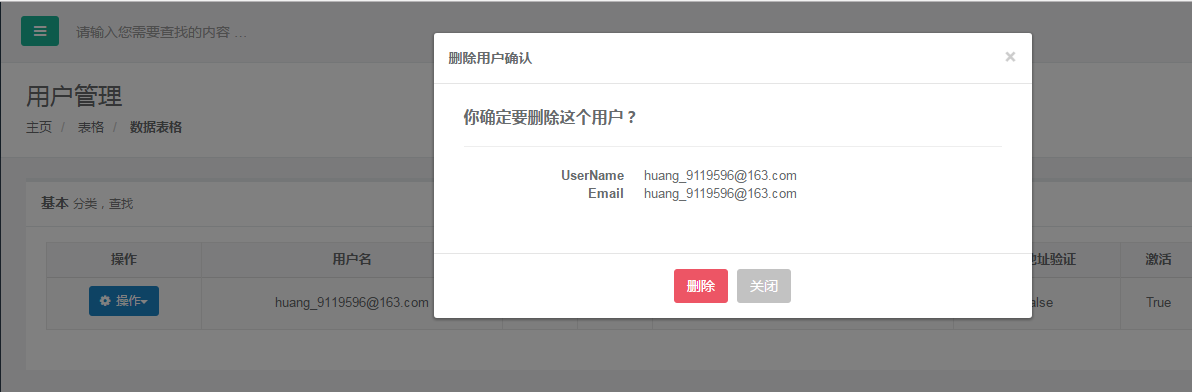
代码就是这么多,最后看一下效果:
本文由黄兵的个人博客原创。
评论列表