文章内容
2025/12/23 18:20:45,作 者: 黄兵
Windows 电脑上生成 SSH Key 并设置密钥登录
如果我们需要在 Windows 电脑上生成 SSH Key,应该怎么操作呢?
在 Windows 上生成 SSH Key
Windows 10/11 自带 OpenSSH,直接打开 PowerShell:
ssh-keygen -t ed25519
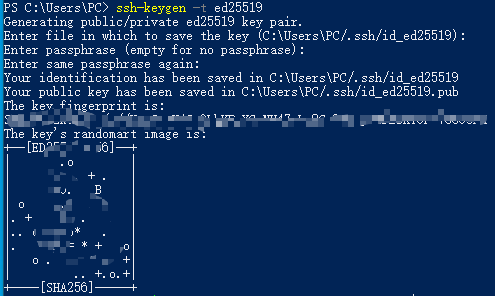
会生成:
C:\Users\你的用户名\.ssh\id_ed25519
C:\Users\你的用户名\.ssh\id_ed25519.pub
上传公钥到服务器
使用 PowerShell(替换服务器 IP):
type $env:USERPROFILE\.ssh\id_ed25519.pub | ssh root@服务器IP "mkdir -p ~/.ssh && cat >> ~/.ssh/authorized_keys"
或使用:
ssh-copy-id root@服务器IP
(如果 ssh-copy-id 不存在,可以安装 Git for Windows,然后用 Git Bash)

在服务器禁用密码登录
编辑:
sudo vi /etc/ssh/sshd_config
设置:
PasswordAuthentication no
ChallengeResponseAuthentication no
UsePAM no
PubkeyAuthentication yes
然后:
sudo systemctl reload sshd
再从 Windows 测试:
ssh root@服务器IP
如果能进去→成功。
其它相关推荐:
评论列表